Inner crystal engraving, also called 3D crystal or subsurface engraving, puts a design inside a clear block of crystal. The surface stays perfectly smooth, and a photo, name or 3D model appears to float in the glass. Light it from below with an LED base and it glows.
Until recently this needed industrial machines. Now a few desktop UV lasers can do it, which has made engraved crystal a popular product for small laser businesses. This guide explains how it works and how to get consistent results.
How inner engraving works
Clear crystal lets the laser beam pass straight through. An inner-engraving laser focuses the beam to a tiny point inside the block, where it creates a microscopic white fracture without touching the surface.
The software turns your design into thousands of these points, arranged in layers. The laser works through the layers one depth at a time, and together the points form the image. A flat design (a name or a logo) uses one or a few layers. A 3D model or a photo converted to 3D uses many, and takes longer.
Because every point is placed by its position inside the block, the crystal’s position matters. If the crystal is shifted or tilted, the whole image shifts or tilts with it.
Which lasers can do it
Inner engraving needs a laser built for it. Standard fiber, diode and CO2 lasers can’t focus a point inside crystal.
Desktop machines that offer inner engraving include:
- xTool F2 Ultra UV. A UV laser with inner-engraving modes in xTool Creative Space.
- xTool X1 with the UV module. xTool’s new modular machine takes several laser types. Its optional UV module is the one that does inner engraving in glass and crystal, and it can handle larger crystal pieces than compact galvo machines.
- WeCreat Lumos Ultra. Its UV laser handles inner and surface crystal engraving, and WeCreat specifies a dedicated lens for inner engraving.
Check your machine’s own documentation for the maximum crystal size and which crystals it supports. Some machines only support certain crystal types for inner engraving.
Choosing crystal blanks
- Use optical crystal. K9 is the usual choice for inner engraving: clear, hard and free of bubbles. Ordinary glass can contain bubbles and stress that spoil the result. Confirm which crystal your laser supports before buying blanks in bulk.
- Look for flat, polished faces. The beam enters through a face of the crystal. A flat, polished face gives a clean image. Bevelled and faceted edges look great, but engrave through a flat face, not through a bevel.
- Pick the shape for the product. Blocks and rectangles suit photos, hearts and rounds make ornaments and gifts, and keychains are a lower-priced item you can engrave in batches.
- Buy from one supplier. Blanks vary in size from brand to brand. Sticking to one supplier means every crystal fits your jig the same way.
Why a jig matters for crystal
Crystal is clear, smooth and often rounded or faceted. On a flat bed it can slide, roll or sit at a slight angle, and you can’t easily tell by looking. Inside the block, a tilt of a degree or two is easy to see in the finished piece.
A jig holds the crystal in a fixed position and at a fixed angle. That gives you:
- The same placement every time, so repeat orders match.
- No rolling or sliding while the laser works through its layers.
- Quicker setup, because you aren’t re-centring the design on each crystal.
- Safer handling, since the crystal isn’t held by tape or putty that can leave residue on a polished face.
Step by step
- Clean the crystal. Wipe off fingerprints and dust with a lint-free cloth. Marks on the face the beam enters through can show in the result.
- Fit the jig and place the crystal. Seat the crystal fully in the jig, with the face you’ll engrave through facing the laser.
- Prepare the design. Load your text, image or 3D model in your laser’s software and choose its inner-engraving mode. Size the design to leave a margin inside the crystal’s edges.
- Check the position. Use your laser’s preview or camera to confirm the design sits where you want inside the block.
- Engrave. Use your laser’s crystal or inner-engraving presets. If it’s a new crystal or design type, test on a spare piece first.
- Inspect and repeat. Check the result under light, then load the next crystal in the same jig.
Selling engraved crystal
Engraved crystal works well as personalised gifts: memorial photos, pet portraits, wedding and anniversary pieces, Christmas ornaments and corporate awards. LED bases and gift boxes add value at little extra cost.
Crystal jigs we make
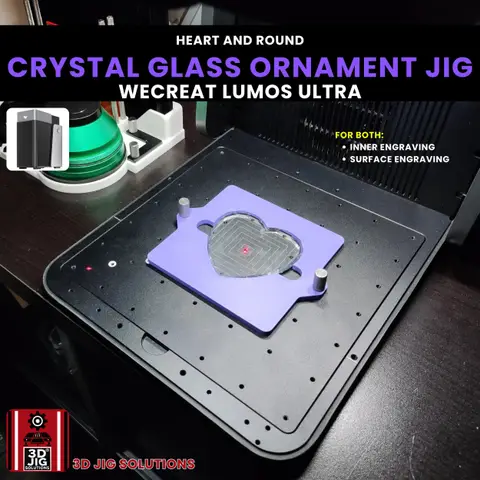
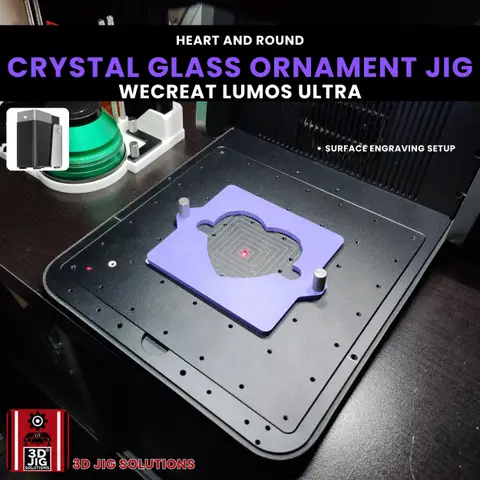
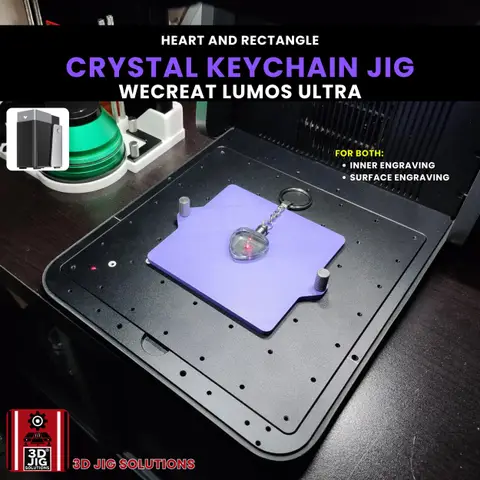
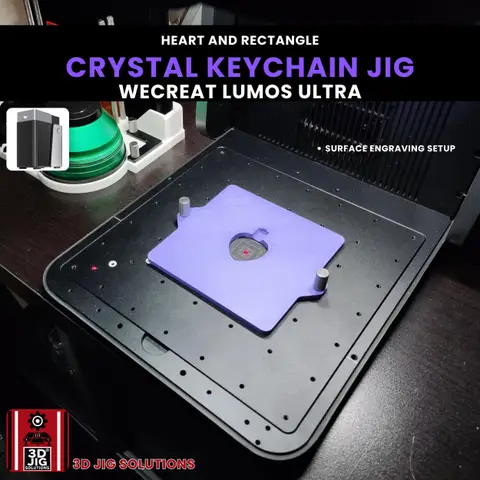
For the WeCreat Lumos Ultra we make a crystal ornament jig for round and heart ornaments, and an LED crystal keychain jig for heart and rectangle keychains. Both hold the crystal steady for inner or surface engraving.
Using a different laser or crystal? We design custom jigs for any blank and most lasers.
Questions and answers
Can my fiber or diode laser engrave inside crystal?
No. Inner engraving needs a laser whose beam passes through clear crystal and focuses at a point inside it, along with software that builds the design in layers. Today that means UV lasers made for it, such as the xTool F2 Ultra UV, the UV module for the xTool X1, or the UV laser on the WeCreat Lumos Ultra. A fiber or diode laser can only mark the surface of glass, and often not well.
What is the difference between inner and surface engraving?
Surface engraving marks the outside of the crystal, like etching. Inner engraving places the design inside the block, so the surface stays smooth and the image seems to float. Many UV lasers can do both.
What laser settings should I use for crystal?
We don't publish settings, because they depend on your machine, lens and crystal. Use the crystal or inner-engraving presets in your laser's software, follow the maker's guide for your machine, and test on a spare crystal first.
Do you make crystal jigs for other lasers?
Right now our crystal jigs are for the WeCreat Lumos Ultra. If you have a different UV laser or a different crystal, send us the crystal size and your laser and we'll quote a custom jig.